


“With this integration, you no longer need to switch windows or use multiple LLMs; everything can be done directly within your monday.com screens, where the AI already has full context of your work and references.”
Work is moving faster than ever, and teams need easier ways to stay productive. monday Sidekick brings the power of AI directly into monday to help teams get work done faster.
Sidekick is a smart AI assistant that brings powerful AI tools and your work apps together in one place. Instead of using many different tools, you can simply ask Sidekick and get things done.
It understands your work and helps you find information, get insights, and move tasks forward quickly all within monday.
What can monday sidekick do?
monday sidekick is your personal AI assistant that can handle a wide range of tasks to accelerate your work at every level.
Here’s what it can do:
- Take action on your behalf, such as sending Slack messages, tagging teammates, and updating work
- Think with you by analyzing board data or researching the web
- Create for you by generating on-brand documents, plans, and visuals
- Brainstorm ideas, write content, and streamline your processes
- Manage your board: create, edit, update, and delete items, groups, columns, and labels
- Read subitems, including column information and updates
- Retrieve answers based on your board’s data or from monday.com’s Help Center
- Surface insights: catch delays, suggest follow-ups, highlight trends, and recommend actions based on team activity
And plenty more, all without leaving monday.com!
How to use monday sidekick
There are several ways to access and use monday sidekick. You can access sidekick on the account level, the board level, and on individual items. It is also embedded within many other features such as the workflow builder and monday workdocs.
- monday sidekick on the account level
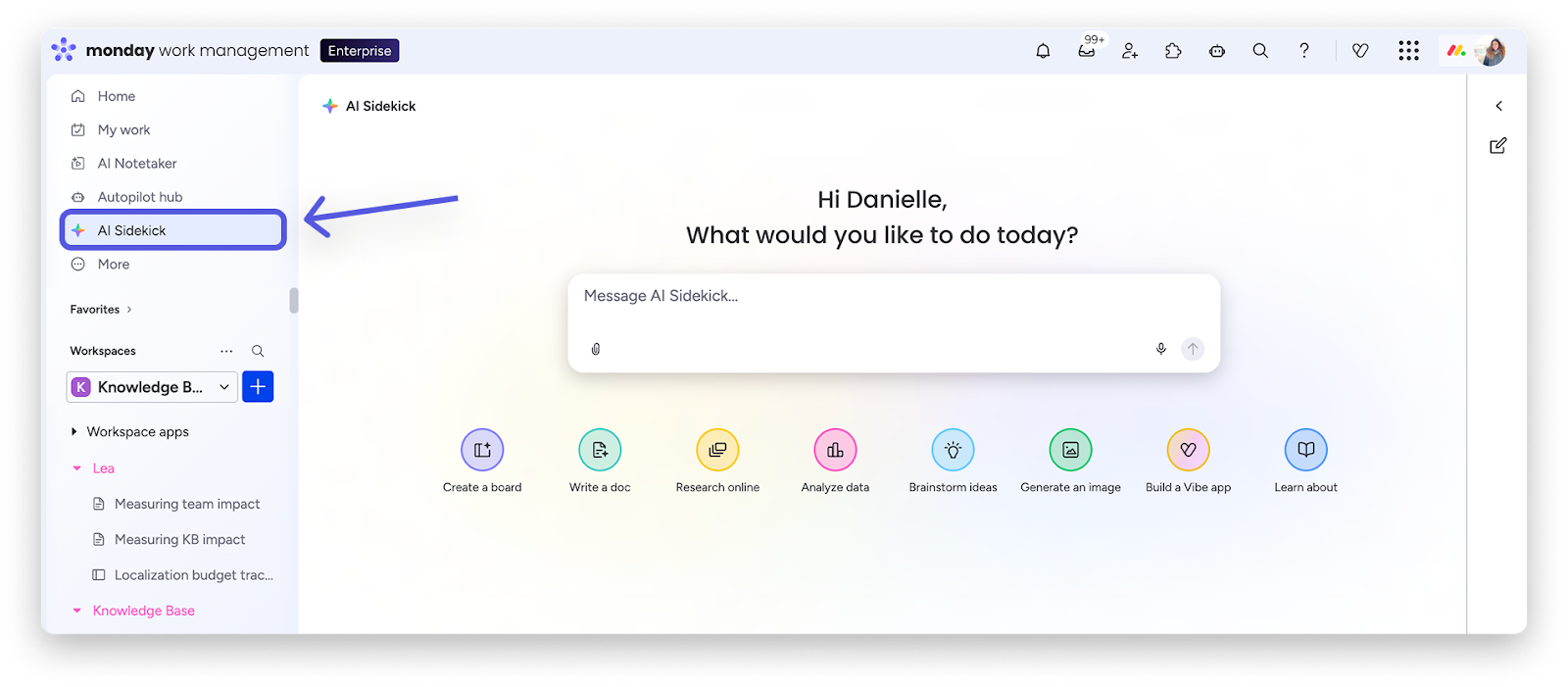
You can access monday sidekick directly from the left pane menu by clicking on AI Sidekick:
This will take you to the sidekick mini-home, where you will receive instant, context-aware help across your monday account.
The sidekick chat helps you collaborate and create more effectively by letting you reference boards, docs, and teammates directly in conversations, leading to seamless teamwork.
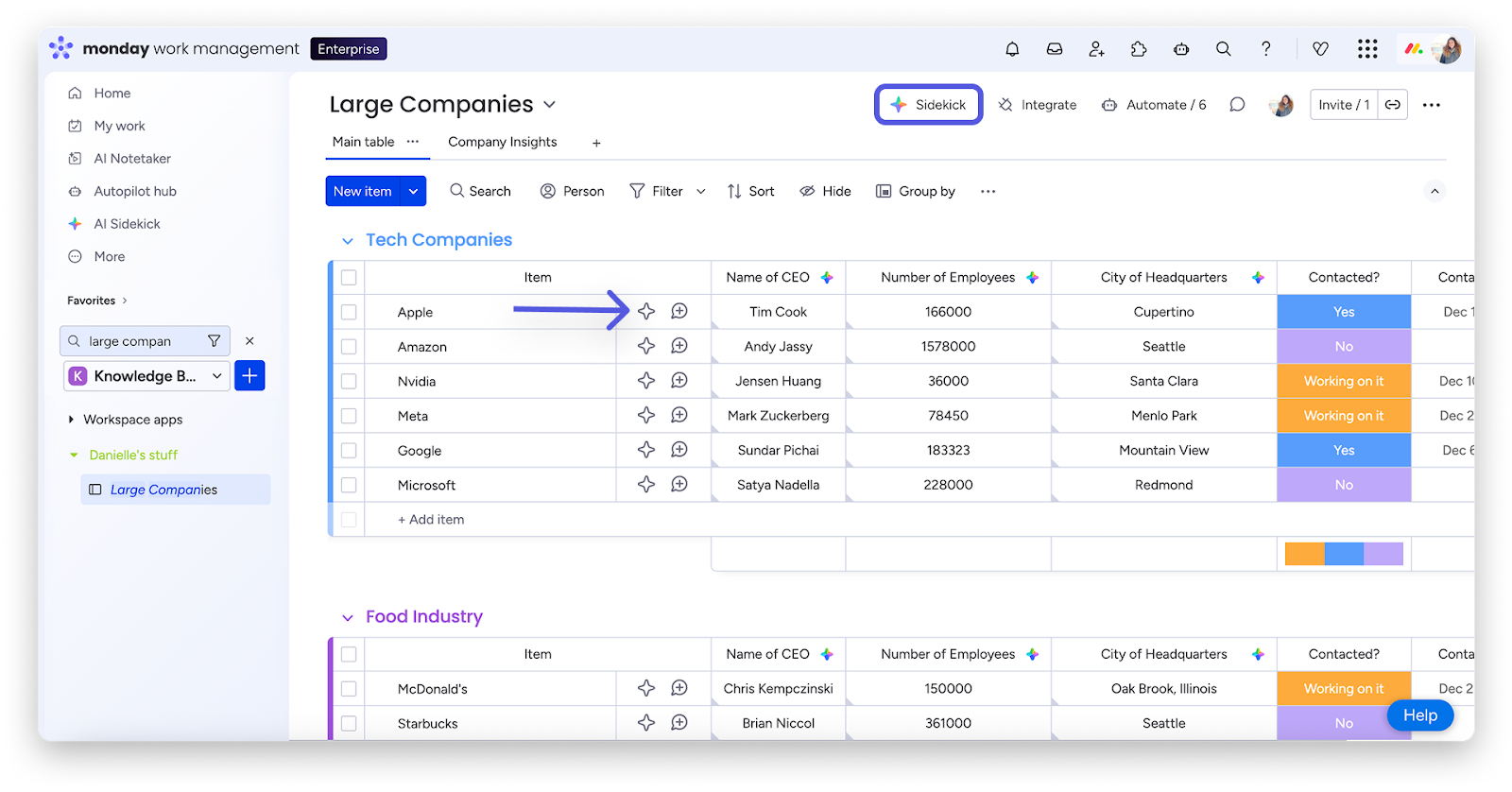
Sidekick also works with full context, pulling information from your monday content, attached files, web search, and advanced language models, so you can get accurate, relevant answers all in one place.
- monday sidekick on the board level
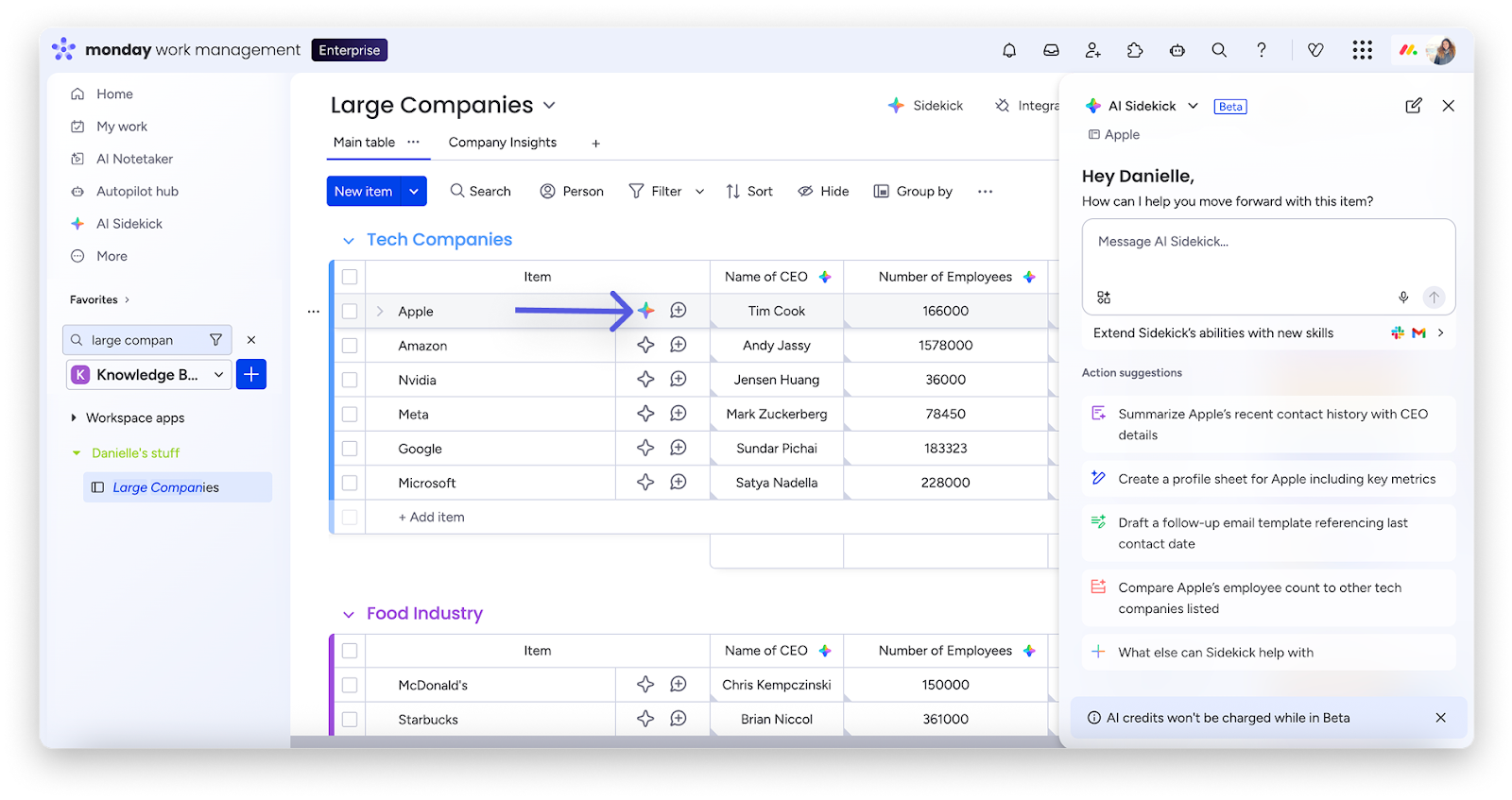
You can use the sidekick colorful AI star icon at the top of your board, or next to individual item names. Click the star to open the chat and start putting monday sidekick to work:
- monday sidekick on individual item
Click the colorful AI star icon next to an item to open the chat and make changes, ask questions, or run work related to that specific item:
You can also use monday sidekick on a specific item by selecting the checkbox next the item you want to use it for:
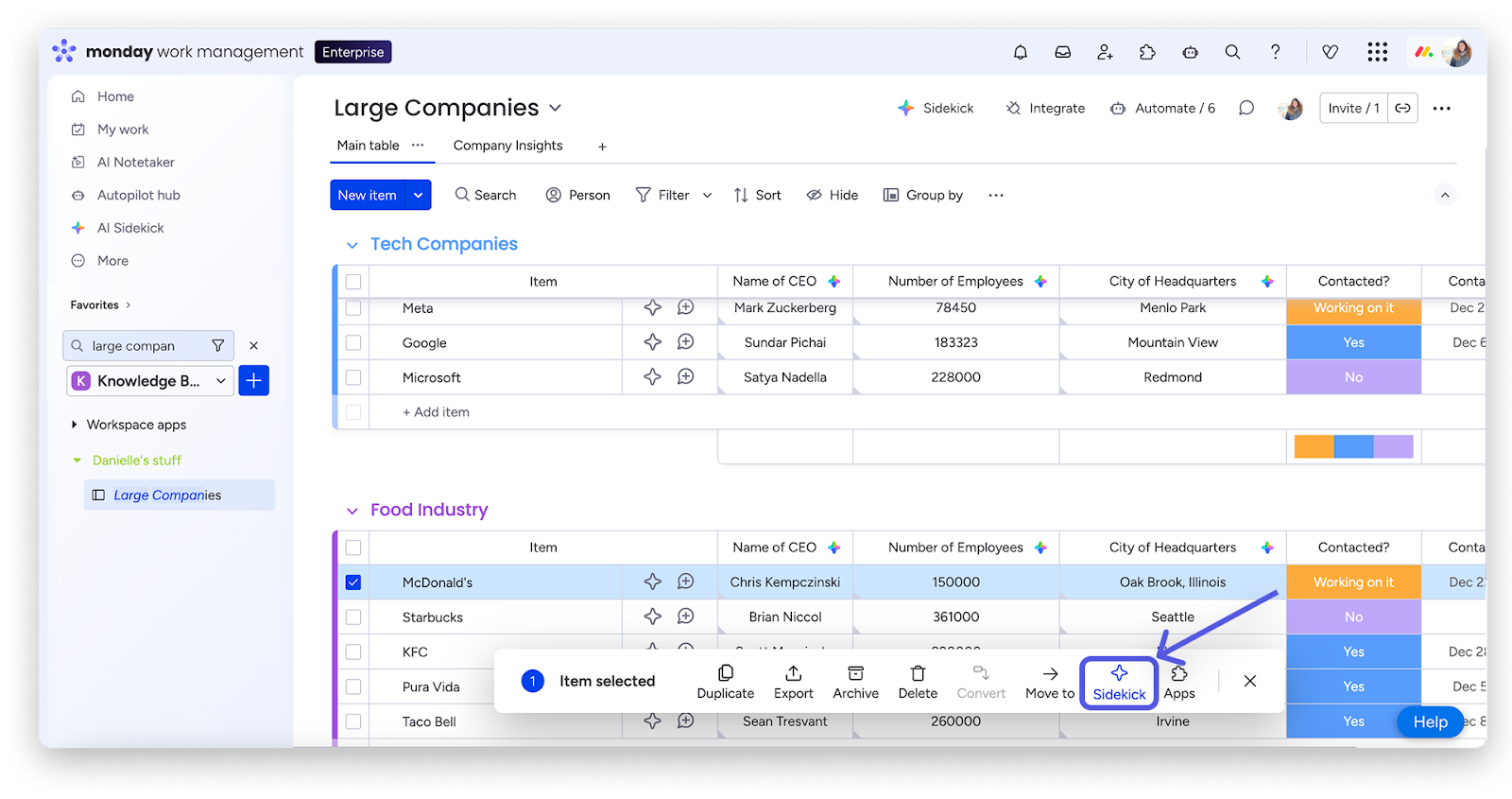
You can select up to 10 items at a time with batch actions.
Once you’ve selected the item, click on monday sidekick, it will open up the chat and you can ask the monday sidekick to use it in the myriad ways it can to help you in your work processes.
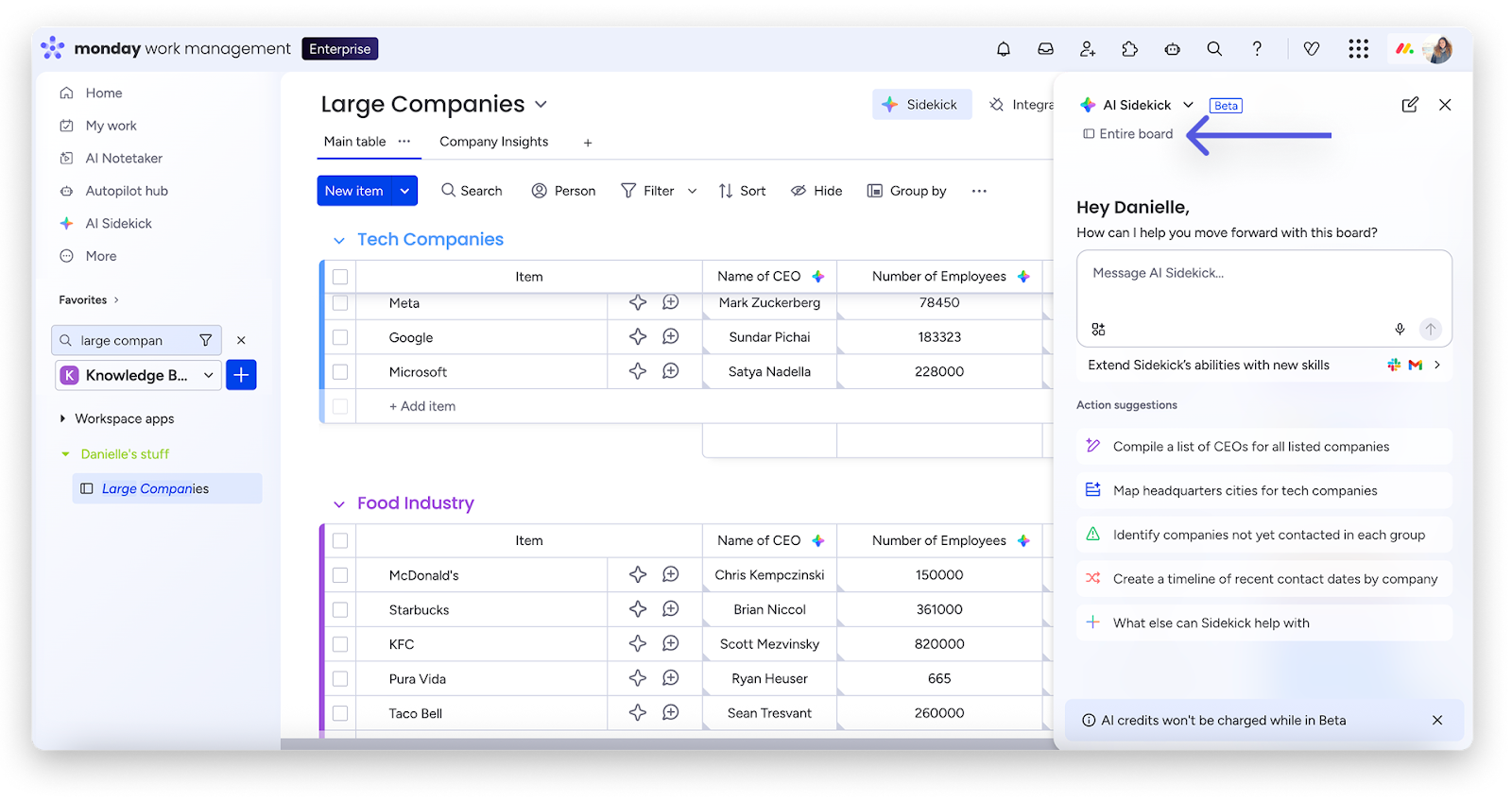
- monday sidekick on the entire board
Click the colorful AI star at the top right of your board to take action across the entire board to engage the monday sidekick in board-wide related tasks.
The chat will open up and you’ll be able to make changes to the entire board. Sidekick will also give you action suggestions based on the board’s data.
Real-Life Use Cases of monday Sidekick
- IT Project Management
IT teams often manage complex development cycles involving feature development, testing, bug fixes, and deployment.
A project manager can ask Sidekick:
“Show all tasks delayed in this sprint.”
Sidekick instantly analyzes the project board and highlights tasks that are overdue or at risk. The manager can then reassign work or adjust priorities to keep the release schedule on track.
For leadership updates, the manager can simply ask:
“Summarize the progress of the current sprint.”
Sidekick generates a clear overview of completed tasks, pending work, and potential risks.
- Sales Pipeline Management
Sales teams manage multiple opportunities across different pipeline stages, making it difficult to track inactive deals.
A sales manager can ask Sidekick:
“Which deals haven’t had activity in the last two weeks?”
Sidekick scans the CRM board and highlights opportunities that require follow-ups. Managers can quickly assign tasks to account executives and ensure no deals are overlooked.
This improves pipeline visibility and helps sales teams stay proactive.
- Recruitment and HR Operations
HR teams often manage multiple hiring processes simultaneously, from candidate screening to interview coordination.
With monday Sidekick, a recruiter can ask:
“Show candidates waiting for interview feedback.”
Sidekick reviews the recruitment board and identifies candidates awaiting feedback. This allows HR teams to manage hiring pipelines more efficiently and reduce delays.
- Marketing Campaign Management
Marketing teams handle campaigns that involve planning, content creation, approvals, and publishing.
A marketing manager can ask:
“What tasks are overdue in the campaign timeline?”
Sidekick analyzes the board and highlights delayed activities so the team can quickly address them and stay on schedule.
5 Ways monday Sidekick Improves Work Management
- Faster Insights
Instead of manually reviewing multiple boards, teams can ask questions and receive immediate insights about project progress, risks, and workloads.
- Reduced Administrative Work
Sidekick helps automate repetitive tasks such as generating summaries, updating statuses, and analyzing board data.
- Better Decision-Making
AI-powered insights help managers identify bottlenecks and take proactive action before problems escalate.
- Improved Collaboration
Automated summaries and updates keep teams aligned without requiring constant meetings or manual reporting.
- Increased Productivity
By reducing manual work, teams can focus on strategic initiatives that drive business value.
Key Features of monday Sidekick
monday Sidekick includes several capabilities that help organizations manage work more efficiently.
- Natural Language Interaction
Users can interact with Sidekick using simple questions or commands, making it easier to manage tasks and retrieve information.
- Real-Time Project Insights
Sidekick analyzes board data and provides instant insights about task progress, project timelines, and workload distribution.
- Automated Workflow Support
Teams can create tasks, update statuses, and assign owners directly through AI assistance.
- AI-Powered Summaries
Sidekick can generate quick summaries of projects, sprints, or campaigns to help managers stay informed.
Conclusion
monday Sidekick represents the evolution of intelligent work management. By combining AI-powered insights with the flexibility of monday.com, organizations can simplify workflows, improve collaboration, and gain real-time visibility into their projects.
Whether managing IT development cycles, sales pipelines, recruitment processes, or marketing campaigns, monday Sidekick empowers teams to work smarter and achieve better outcomes.
Ready to Experience Smarter Work with monday Sidekick?
AI is transforming the way teams manage work—and organizations that adopt intelligent tools today can move faster, collaborate more effectively, and make better decisions.
With the power of AI built directly into monday.com, monday Sidekick helps teams automate repetitive tasks, gain real-time insights, and streamline workflows across departments.
Want to see monday Sidekick in action?
Get in touch with our team to schedule a demo and discover how AI can transform the way your teams plan, collaborate, and deliver results. .